
Running out and grabbing the latest updates for Windows 10 isn’t always recommended. Quite a few people had issues with the October 2018 update, and it was delayed several times. But that didn’t stop some of the hardware team at PCG from taking the plunge with the Windows 10 May 2019 update. Or at least, trying to take the plunge in some cases.
I’ve been unlucky it seems, with all three of my Ryzen testbeds coming up with the same error message. Joanna meanwhile didn’t have any problems with her Ryzen PC. Microsoft has a support page suggesting one possibility, outdated AMD RAID drivers, but none of us are using RAID and the RAID drivers wouldn’t even install on Jarred’s PCs (with a message saying they’re not supported and a Threadripper logo). AMD’s support page didn’t provide any help either. After updating graphics drivers and chipset drivers—with three different GPUs, just for good measure—my AMD rigs remain stuck on build 1803.
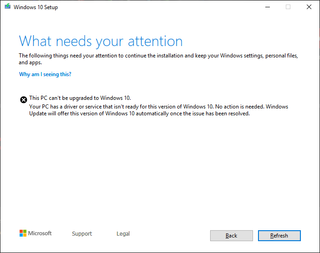
For what it’s worth, Joanna is using an Asus ROG crosshair VII Hero X470 motherboard with a GTX 1080 Ti. The PCs I’ve tried are using Gigabyte X370 Aorus Gaming 5, MSI B350I Pro AC, and MSI X470 Gaming M7. All are running recent BIOS revisions and the latest 19.10.0429 chipset drivers, but to no avail. It’s apparently something else. Meanwhile, I’ve had no issues updating an Intel Z370 and Intel Z390 based PCs (Gigabyte and MSI motherboards), though an older PC with an X58 motherboard and Core i7-965 also generated the same error.
I’ll be keeping an eye on things over the coming weeks, as well as trying to figure out the root cause. It doesn’t help that Microsoft’s error message is super vague—”a driver or service” is to blame, but it doesn’t tell me which one. Maybe next week will be better.
Share your experiences (if you have them) with installing the Windows 10 May 2019 update in our comments. Did it take okay, in particular for Ryzen PCs? If so, post your specs.
All Rights Reserved for Jarred Walton
 Productivity Hub