
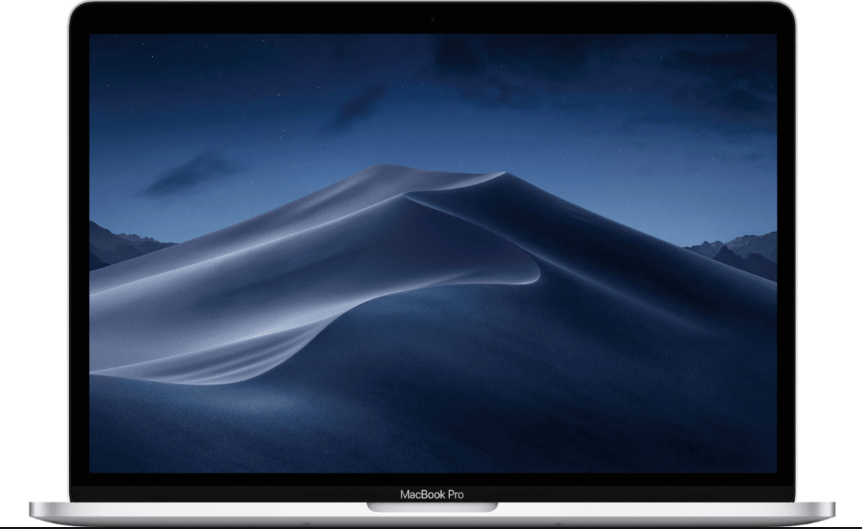
The new 2018 13 and 15-inch MacBook Pro models continue to use the same design as the 2016 and 2017 MacBook Pros, with the smaller, thinner, and lighter design that Apple first introduced two years ago.

Constructed entirely from aluminum, the MacBook Pro is available in either Silver or Space Gray, with a thin hinge design, a wide Force Touch Trackpad, a third-generation butterfly keyboard, a Touch Bar, and no light-up rear Apple logo.

The 15-inch MacBook Pro measures in at 13.75 inches long, 9.48 inches wide, and 15.5mm thick. It weighs four pounds.

The 13-inch MacBook Pro measures in at 11.97 inches long, 8.36 inches wide, and 14.9mm thick. It weighs three pounds.

Display
The 2018 MacBook Pro models continue to use the same display with 500 nits of brightness and P3 Wide Color support that was introduced in earlier MacBook Pro machines, but with one notable addition — True Tone support.
True Tone works through a multi-channel ambient light sensor that’s included in the new MacBook Pro models, which is able to determine both the brightness of the room and the color temperature. After determining the white balance, the MacBook Pro is able to adjust both the color and intensity of the display to match the room’s lighting for a more natural, paper-like viewing experience that also cuts down on eyestrain.

True Tone has been previously available in the iPad Pro and the iPhone X, but this is the first time it’s been brought to a Mac. It does require the display of the MacBook Pro for the feature to work.
When using certain external monitors with the new 2018 MacBook Pro models, including the Apple Thunderbolt Display using an Apple Thunderbolt 3 to Thunderbolt 2 adapter, the LG UltraFine 5K Display, and the LG UltraFine 4K Display, the built-in True Tone feature also extends to the connected display.
The display of the 15-inch MacBook Pro features a 2880 by 1800 native resolution at 220 pixels per inch, while the display of the 13-inch MacBook Pro features a 2560 by 1600 resolution at 227 pixels per inch.
Both displays support millions of color and include P3 Wide Color as mentioned above for more vivid, true to life colors especially in the green and red spectrums.
Keyboard
The 2018 13 and 15-inch MacBook Pro models include a third-generation butterfly keyboard that Apple says offers a quieter typing experience.

The keyboard uses butterfly-style keys with dome switches beneath each key that have been optimized for a more responsive feel, delivering a greater sense of keyboard travel for a more satisfying press under the fingers.


Prior butterfly keyboards in 2016 and 2017 MacBook Pro models have been criticized for occasional failures when exposed to crumbs, dust, and other small particulates. Apple has said that the focus of the keyboard redesign was making it quieter, but while the company has not publicly admitted it, it also improves reliability and better prevents dust from getting into the keys.
An iFixit teardown of the 2018 MacBook Pro found a thin, silicone barrier that’s been added to the keyboard, providing protection for each key. iFixit speculated that the membrane was an ingress-proofing measure put in place to prevent dust from getting in the keys, which Apple quietly confirmed in documents sent to Apple Authorized Service Providers.


Photo of the silicone barrier in the third-generation butterfly keyboard via iFixit
iFixit exposed the new 2018 MacBook Pro keyboard to dust and sand to test its durability, and found that the dust it settled along the edges of the membrane, leaving the butterfly mechanism of the keys protected.
The silicone barrier did prevent most dust from getting into the butterfly keys, but when exposed to sand, the membrane wasn’t able to fully prevent keys from seizing up. This suggests that the membrane is not impenetrable, but it’s more protection than offered in earlier versions of the butterfly keyboard.


Glowing dust shown at the barriers of the membrane, which prevented it from getting into the butterfly mechanism
For earlier MacBook Pro models, Apple launched a keyboard repair program that has seen the company offering free repairs for faulty keyboards.
Trackpad
As with previous MacBook Pro models, much of the bottom of the 2018 MacBook Pro machines is taken up by the Force Touch trackpad, which doubled in size starting in 2016. Apple introduced the larger trackpad to give users more room for gestures.
The Force Touch trackpad has no traditional buttons and is instead powered by a set of Force Sensors, allowing users to press anywhere on the trackpad to get the same response. A Taptic Engine powered by magnets provides users with tactile feedback when using the trackpad, replacing the feel of a physical button press.

The Force Touch trackpad supports a light press, which is used as a regular click, along with a deeper press or “force click” as a separate gesture that does things like offer up definitions for a highlighted word.
Touch Bar
The 2018 MacBook Pro models continue to feature a Touch Bar, which is a small OLED Retina multi-touch display built into the keyboard where the function keys traditionally go. The Touch Bar is contextual and can perform a huge range of functions on the Mac depending on which app is in use.

The Touch Bar is a matte-style display that blends right in with the rest of the keys on the keyboard, and in 2018 MacBook Pro machines, it supports True Tone, allowing the white balance to be adjusted to match the ambient lighting conditions.

Interacting with the Touch Bar is done through taps, swipes, and other multi-touch gestures, with support for up to 10 fingers at a time available.
The Touch Bar consists of a static (but customizable) Control Strip on the right housing the typical system functions you need to access quickly, like volume, audio playback, brightness, and Siri, with an ESC key on the left.
In the middle, there’s an open spot that dynamically displays the most useful controls for the app you’re using, and most third and first-party apps offer Touch Bar support.
Touch ID
Next to the Touch Bar, there’s a Touch ID fingerprint sensor with second-generation Touch ID functionality that’s covered in sapphire crystal much like the Touch ID Home button on some iPhone models.
Touch ID on the MacBook Pro can be used in lieu of a password, unlocking the Mac when a finger is placed on the sensor. It also replaces a password for password protected apps, and it can be used to make Apple Pay purchases in Safari.

Touch ID is powered by a separate Apple-designed T2 chip with a Secure Enclave that keeps your fingerprint data and personal information safe.
Thunderbolt 3
All 2018 13 and 15-inch MacBook Pro models are equipped with four USB-C supports with support for USB 3.1 Gen 2 and Thunderbolt 3, for Thunderbolt transfer speeds of up to 40Gb/s and USB transfer speeds of up to 10Gb/s.
Each port on the MacBook Pro models is identical and can be used for the same functions, so every one can be used to power the machine. All ports support the following connections: power, Thunderbolt, USB, DisplayPort, HDMI, and VGA.
Over Thunderbolt 3, the 15-inch MacBook Pro can power two 5K displays at one time or four 4K displays. The 13-inch MacBook Pro can power one 5K display or two 4K displays. All external displays are able to run at 60Hz.
In 2016 and 2017 13-inch MacBook Pro models, the left side Thunderbolt 3 ports had reduced bandwidth due to the fact that the chips used in the machines only supported up to 12 PCI Express lanes. The processors in the 13-inch 2018 MacBook Pro support up to 16 PCI Express lanes, so all four Thunderbolt 3 ports support maximum data transfer speeds of 40Gb/s.
2018 15-inch MacBook Pro models support DisplayPort at High-Bit Rate 3, a signal standard of both DisplayPort 1.3 and DisplayPort 1.4. 13-inch MacBook Pro models support DisplayPort at High-Bit Rate 2, a signal standard of DisplayPort 1.2.
13 and 15-inch Models both have the same compatibility with external displays as previous-generation models. The 15-inch MacBook Pro supports up to two 5K displays or four 4K displays, while the 13-inch MacBook Pro supports one 5K display and up to two 4K displays.

All Rights Reserved for MacRumors Staff
 Productivity Hub